Showing posts with label KDE. Show all posts

11/06/2019

KCM Wacom settings on (K)ubuntu 16.04

There's a handy KDE System Settings module for configuring Wacom tablets - calibration, screen areas, you name it. I was rather keen to have it handle my old Graphire4 on a multi screen setup on my work desktop (Ubuntu 16.05).
Sadly, the wacomtablet package (https://github.com/KDE/wacomtablet) seems to have been dropped from the repos between 14.04 and 19.04 due to ongoing bugfixes in dependencies. They do offer instructions for manual compiling - with dire warnings that there'd there be no easy uninstall. 'make uninstall' worked nicely, though.
However, I kept running into missing headers etc., until I found the one version that worked, 2.9.82.

Command line log:
wget https://github.com/KDE/wacomtablet/archive/v2.9.82.zip 
unzip v2.9.82.zip 
cd wacomtablet-2.9.82 
mkdir build 
cd build  
cmake ../ -DCMAKE_INSTALL_PREFIX=/usr -DCMAKE_BUILD_TYPE=Release -DKDE_INSTALL_USE_QT_SYS_PATHS=ON 
make 
sudo make install

Et voilà!

25/03/2019

Help! Kile is stuck!

"The file x.kilepr cannot be opened as it does not appear to be a project file." Which didn't stop Kile from "scanning project files", which in turn blocked the entire interface. All in vain, I might add, since the project file had moved anyway, so there was nothing to scan in a folder that didn't exist any more. An existential crisis ensued: it is almost midnight, after all, and I'm in mid deadline panic.
Ah well, let's find kilerc, which happens to be in ~/.config/ (if there is a method to KDE's config folder organisation's madness I haven't found it yet). The culprit was in the FilesOpenOnStart section:

[FilesOpenOnStart]
DocsOpenOnStart0[$e]=/path/to/file1.tex
DocsOpenOnStart1[$e]=/path/to/file2.tex
EncodingsOfDocsOpenOnStart0[$e]=UTF-8
EncodingsOfDocsOpenOnStart1[$e]=UTF-8
NoDOOS=2
NoPOOS=1
ProjectsOpenOnStart0[$e]=/this/path/is/invalid.kilepr

I just had to adapt the numbers and paths of docs and projects open on start after all. 

26/03/2018

Spyder 3.2.8, pip3 and and PyQt5

I recently ran into segfaults on all my computers after upgrading spyder via pip3. Lots of Qt5 error messages. The trouble seems to be PyQt5-5.10.1; spyder 3.2.8 requires at least 5.10.0 (which happens to work). Thus pip3 install --upgrade PyQt5==5.10.0 spyder 
solved my issue.
Note to self: pip3 install PyQt5== is a handy way to list available versions. Sadly, it's deprecated (--use-deprecated=legacy-resolver).
Second note to self: There's also spyder==4.0.0b1 which seems to work with newer PyQts. Good thing I switched to virtual environments.

08/09/2017

How to get okular to play nice with pretty much all embedded movies

The trick is to have VLC play them, because vlc plays basically everything.
Install via apt-get either phonon4qt5-backend-vlc or phonon-backend-vlc or both.
In System Settings -> Audio and Video, prefer 'Phonon VLC' in the backend tab. If in doubt, restart Okular.

18/06/2016

If Plasma's network manager doesn't display available networks after suspend/lock screen/etc....

sudo service networking restart
sudo service network-manager restart
Bingo.

31/05/2016

Damn you, kscreen

Actually, I like kscreen. The desktop display configuration interface is clicky, draggy and intuitive, and apparently they store settings for specific external monitors by EDID and feed them into xrandr once you connect the monitor.
Enter my Zenbook, various microHDMI to VGA/HDMI dongles, external monitors and projectors. What happens, usually 10 minutes before an important presentation, on a bus without internet and my boss getting antsy, is KDE presenting me with a black screen and the mouse pointer stuck at the top screen edge. Panic mode fix: create a new user from the terminal. In the end I was stuck with 3 different temporary user accounts and no graphical interface unless the µHDMI to VGA dongle was plugged in. Don't judge me, I was overworked.
Still, the troublesome configuration had to be somewhere in my home directory, so I needed to do some more creative renaming, i.e. .kde to .notkde, restarting sddm and praying to the deity of the moment.
Kscreen's config files happened to be in ./local/share/kscreen, I just deleted them all, problem solved.
Got a kernel update in the process and now I need to consolidate user accounts…

Update: As of 09/2020, kscreen still has problems with dongles. (PD USB-C hub with HDMI, XPS13 with BenQ screen) I got sick of constantly nuking the config files and tried apt remove kscreen. Config files still got written. Turns out you have to disable the kscreen service (System Settings->Startup). And now I'd better get used to Xrandr.

03/02/2016

Three KDE5 quirks bugging me most right now

I recently upgraded to Kubuntu 15.10 (16.04 by now) and Plasma 5.
Plasma 5 is gorgeous, but still a bit experimental in places. Erm, make that six and counting.
  • Baloo desktop search. Once the index is written (takes hours on first run), it's actually usable. However, the config dialog in the system settings is incomplete. You're better off editing ~/.config/baloofilerc, as explained here:
    https://community.kde.org/Baloo/Configuration
    Also, entirely disabling baloo search knocked out Dolphin's nice in-browser file search.
  • Dolphin hangs on startup in the home directory when hidden files are set to visible and Kile is running at the same time. (caused by Kile's  ~/.lyxpipe.in and ~/.lyxpipe.out) Apparently fixed upstream: https://bugs.kde.org/show_bug.cgi?id=352828
  • The device notifier has lost the automount configuration. There's a hack using the kde4
    versions:
    Edit /usr/share/kde4/services/kded/device_automounter.desktop using the following line (value was 1 before): "X-KDE-Kded-phase=0"
    Use kcmshell4 kcmkded and kcmshell4 device_automounter_kcm to enable and configure automounting. Apparently fixed upstream as well.
    Source: https://forum.kde.org/viewtopic.php?f=289&t=126846
  • Dolphin context menu is missing the Ark extraction services. Fixable by sudo ln -s /usr/share/kde4/servicetypes/konqpopupmenuplugin.desktop /usr/share/kservicetypes5/
    Source: https://bugs.launchpad.net/ubuntu/+source/dolphin/+bug/1499530
  • Dolphin etc. doesn't remember changes in mime type associations. Apparently it reads from one mimeapps.list file and saves to a different one. The solution is to link both to the same file.
    ln -s ~/.local/share/applications/mimeapps.list ~/.config/mimeapps.list
    Source: https://bbs.archlinux.org/viewtopic.php?id=202636
  • Dolphin doesn't display PDF previews, even though they can be enabled in Preferences with kdegraphcis-thumbnailers installed.
    Workaround: sudo ln -s /usr/lib/x86_64-linux-gnu/plugins/* /usr/lib/x86_64-linux-gnu/qt5/plugins/ Sources: https://bugs.kde.org/show_bug.cgi?id=351913 http://osdir.com/ml/ubuntu-bugs/2016-04/msg19852.html

27/11/2015

Bunched up fonts in printing (from Okular)

Left side: This is how it looked in Okular. Right side: This is how it was printed. Solution courtesy of  ubuntuforums.org.
Pull up the "Fonts" tab in File->Properties… and look for non-embedded fonts in the document. In this case, Helvetica is substituted wrongly.
Font substitutions are handled in ~/.config/fontconfig/fonts.conf (on (K)ubuntu, that is). I added a new match tag to the end of the file (MS core fonts are installed, so I put in Arial, if not, find a free Helvetica/Grotesk):
 <match target="pattern">
  <test qual="any" name="family"><string>Helvetica</string></test>
  <edit name="family" mode="assign" binding="same"><string>Arial</string></edit>
 </match>
</fontconfig>


Afterwards, I ran fc-cache from a shell and checked whether the substitution was correct:
$ fc-cache 
$ fc-match Helvetica 
Arial.ttf: "Arial" "Normal"

Note: I didn't delve into why the substitution went wrong. Tex Gyre Hero actually seems to be working Helvetica substitute, and the weird bunching showed up all over the printout, not just in the sans serif parts. Whatever, it worked.

Note2, January 2024:

Another reason for misidentified fonts is if the font name encoded in the TTF file is different. In that case, changing it to what Okular expects works as well.  See thisHowTo and  handy python script provided by David Condrey on Superuser.

26/03/2015

KDE spell check, personal dictionary

I use Kile's automatic spell highlighting a lot. For some reason, it keeps complaining about ubiquitous verbiage like 'advective' or 'metachronal', which made me dig/google for the personal dictionary location.
According to https://forum.kde.org/viewtopic.php?f=20&t=98628, it's text files in the
~/.config/enchant folder, so for each localisation you're using, just edit the word list in e.g. 'en_GB.dic'.
For changes in the list to take effect, switch to a different localisation and back again.

10/03/2015

In praise of arandr


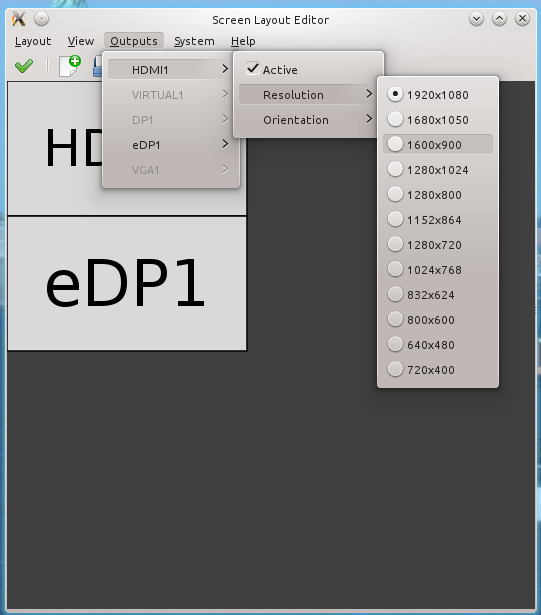
I really like KDE's visual display settings module, but it lacks a profile saving tool. 
Last Friday I had to give a rather important presentation in an extremely time constrained setting and I had to rely on KDE kind of magically remembering the settings (side by side with the second display/projector on 1024x768) from the speaker ready room after removing the cable. (yay, open source, by the way - Windows and Mac users were fighting aspect ratio and resolution problems left and right…)
Enter arandr to the somewhat belated rescue (in the standard repos). Not quite as pretty as the KDE original, but a very capable xrandr graphical front end that has the capability of saving settings as xrandr shell scripts, e.g. my presentation mode as:
#!/bin/sh
xrandr --output HDMI1 --mode 1024x768 --pos 1920x1080 --rotate normal --output VIRTUAL1 --off --output DP1 --off --output eDP1 --mode 1920x1080 --pos 0x1080 --rotate normal --output VGA1 --off
So next time, I'll just have a nice folder view on my desktop with the PDF right next to the shell script:

20/02/2014

Kile, biber and path issues on Precise

I've grown to like biber as a bibTeX backend, as it's highly configurable. However, it was a bit of a stretch to get it to work on my work computer, which is on Kubuntu Precise LTS.

08/05/2013

Alekto - dual booting a Zenbook

After Tisiphone, an Asus Bamboo U43JC, bowed out after 2 1/2 years with FUBAR hinges, a 3/4 working LCD panel and a dead battery, the natural choice was to stick to Asus, of course. In fairness, finding something ultraportable with a full metal body and decent screen resolution that's not a Macbook Air and doesn't break the bank doesn't leave you many options beyond a Zenbook. I went for the UX31A DB71 with a 256 GB SSD and i7 3517U processor.

04/02/2013

Okular inverse search for multiple editors (e.g. Kile)

Setting up inverse search for Kile/Okular is well documented, e.g. in the official Kile docs. What has always bugged me, though, is that the inverse search editor is set globally in the okularpartrc config file, which means that you can't set up inverse search with different editors for different source code types.
I put together a workaround that changes Okular's editor choice to Kile when Okular is called from Kile by temporarily overwriting the okularpartrc file.

07/06/2012

Compose key in KDE

The compose key is a useful feature if you regularly type international/special characters. Key combinations for pretty much everything can be found here:
https://help.ubuntu.com/community/GtkComposeTable
Enabling the key in KDE is a bit laborious though:
System Settings->Input Devices>Keyboard->Advanced tab->Compose key position.


14/05/2012

Scheduled backups to an external hard drive

After a narrowly averted data loss, I decided to schedule daily backups to an external hard drive. The scheduler of choice for this would be anacron, which runs tasks after a specified delay at startup, but only if it it hasn't run before in a specified time period (daily, weekly etc.) This is arguably better than a startup job running at every boot or a cron job running every day at a certain time regardless whether the computer is switched off.
I used unison as the backup synchronisation manager, it has both a GUI interface and an intervention-free console batch mode. Copying exceptions and permissions rules can be easily defined in profile scripts. You can't run this script in pure batch mode, as you have to tell the user to connect the external drive before starting the backup, so I used the Kdialog (zenity on Gnome/Unity) app for pop-up messages.

20/10/2011

Kmail opens hyperlinks in two browser tabs

I found the solution on the KDE community forums: Go to System Settings->Default Applications->Web Browser (not KMail settings) and remove the '%U' argument.

24/08/2011

enabling Nepomuk/Strigi search eats up home directory space

A few days ago I decided to enable Krunner's desktop search/strigi implementation - strigi indexing was not enabled before.
It might have slowed down Medusa a bit, but the most noticeable feature was my 30GB home partition running constantly out of disk space.
File/directory size analysis with du -h --max-depth=2 | grep '^[5-9][0-9]\{2\}M\|[0-9]G' > listfile.txt and ls -lha | grep 'G' ~  found the culprit: a whopping 13 GB .xsession-errors file. This is a well-known problem, apparently Nepomuk/Soprano is pretty garrulous. 
First aid: delete the file and reboot. For a more permanent workaround, a poster in this discussion suggests linking .xsession-errors to /dev/null via an autostart shell script. As an alternative, I'd suggest adding ln -sf /dev/null /home/<yourusername>/.xsession-errors to your ~/.bashrc.
As an aside: for anyone puzzled by the redland/sesame backend debate, the current backend is virtuoso and supposed to be faster than any of the above.

11/03/2011

Attempting to sync an iPod touch 4G

How to live with an iPod Touch 4G and not too much Windows involvement...

31/01/2011

Kile, KDE 4.6 and autocompletion

After installing KDE 4.6 (from Kubuntu backports), LaTeX autocompletion was gone in Kile 2.1 β4. It worked on β5, which can be downloaded as a source tarball from the Kile homepage.
I followed the README instructions, but used sudo checkinstall instead of sudo make install to get a .deb package (source ubuntuforums). The kile executable didn't end up in a PATH directory, so I linked it into /usr/bin via cd /usr/bin; sudo ln -s ~/kile-install/bin/kile 
The package system tried to 'update' to β4, so I had to protect the newer version with e.g. sudo aptitude hold kile.

Note on a second install: with just cmake . / make / sudo checkinstall instead of the README approach I ended up with the kile executable in /usr/local/bin. I prefer that to the version in /home, as kile is integrated into the package system via checkinstall anyway.

16/07/2010

Really, openSuSE!

Touchpad control - great!
Improved wireless handling - impressive!
No desktop effects without kernel tweaking - priceless.

The 11.3 installation report: