Showing posts with label hardware. Show all posts

26/10/2019

IcyBox IB-RD3621U3 RAID1 with Ubuntu 16.04

RAID is not backup, yeah, yeah, yeah…
Still, my laptop is bursting its 512GB SSD and anything is better than my current backup method of randomly distributing copies of important data on external USB drives in various states of health.

I settled on a mid price solution, two 4TB Seagate Barracuda and an IcyBox  IB-RD3621U3 RAID enclosure, for about 250€ in total.  Rsynced to a 4TB WD mobile drive I keep in daily use.
Setup procedure:
  1. S.M.A.R.T. self test. Note: the IcyBox board is not Smart capable. To do a full initial self test on the drives, plug them into a desktop SATA. (smartctl -d sat provides output, but the test will fail)
  2. Disk installation in the drive: note - there are handy stickers 'HDD1' and 'HDD2' in the box. Label your disks to correspond with the HDD1 and 2 labels on the front of the IcyBox.
  3. RAID mode:
    Switch the box off (1). Set the pins under MODE (2) to RAID1. Hold OK (3) pressed, switch the box on (1) and keep holding OK until the LED band at the front has stopped blinking in red (should take about 10 seconds)
     
  4. Connect to a computer. The box should now register as a single drive in GParted, which you can format at will.
  5. Note: GParted via the Dell XPS USB-C dongle hell didn't work too well, failed at creating the partition table.


11/06/2019

KCM Wacom settings on (K)ubuntu 16.04

There's a handy KDE System Settings module for configuring Wacom tablets - calibration, screen areas, you name it. I was rather keen to have it handle my old Graphire4 on a multi screen setup on my work desktop (Ubuntu 16.05).
Sadly, the wacomtablet package (https://github.com/KDE/wacomtablet) seems to have been dropped from the repos between 14.04 and 19.04 due to ongoing bugfixes in dependencies. They do offer instructions for manual compiling - with dire warnings that there'd there be no easy uninstall. 'make uninstall' worked nicely, though.
However, I kept running into missing headers etc., until I found the one version that worked, 2.9.82.

Command line log:
wget https://github.com/KDE/wacomtablet/archive/v2.9.82.zip 
unzip v2.9.82.zip 
cd wacomtablet-2.9.82 
mkdir build 
cd build  
cmake ../ -DCMAKE_INSTALL_PREFIX=/usr -DCMAKE_BUILD_TYPE=Release -DKDE_INSTALL_USE_QT_SYS_PATHS=ON 
make 
sudo make install

Et voilà!

23/04/2019

XPS13 webcam doesn't wake up (BIOS fix)

The XPS13 9370 (summer 2018's model) webcam is horrible anyway (still stuck at the bottom of the display). However, it didn't help that it stopped working when the laptop resumed after suspend (all Kubuntu versions I used from 18.04 upwards).
According to this Dell support discussion, it was a BIOS problem that was fixed in BIOS 1.5.0 - I had 1.3.3. Updating seems to have fixed the problem.
Steps:
Get the current BIOS installer from here.
Put it on a flash drive (unless you've got a USB-C one, the Dell dongle works. MicroSDs don't)
Plug in your power supply.
Press F12 during re-boot, select BIOS Flash Update. There should be a drop-down menu top left on the next screen that lets you select and browse the flash drive. Pick the EXE installer. Install. Reboot.

31/05/2016

Damn you, kscreen

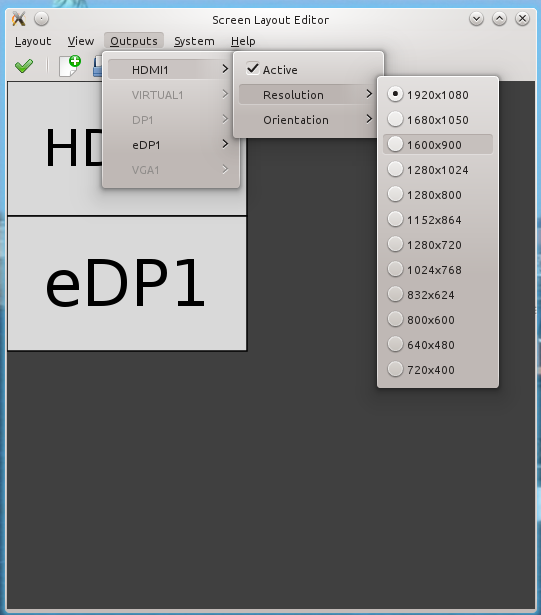
Actually, I like kscreen. The desktop display configuration interface is clicky, draggy and intuitive, and apparently they store settings for specific external monitors by EDID and feed them into xrandr once you connect the monitor.
Enter my Zenbook, various microHDMI to VGA/HDMI dongles, external monitors and projectors. What happens, usually 10 minutes before an important presentation, on a bus without internet and my boss getting antsy, is KDE presenting me with a black screen and the mouse pointer stuck at the top screen edge. Panic mode fix: create a new user from the terminal. In the end I was stuck with 3 different temporary user accounts and no graphical interface unless the µHDMI to VGA dongle was plugged in. Don't judge me, I was overworked.
Still, the troublesome configuration had to be somewhere in my home directory, so I needed to do some more creative renaming, i.e. .kde to .notkde, restarting sddm and praying to the deity of the moment.
Kscreen's config files happened to be in ./local/share/kscreen, I just deleted them all, problem solved.
Got a kernel update in the process and now I need to consolidate user accounts…

Update: As of 09/2020, kscreen still has problems with dongles. (PD USB-C hub with HDMI, XPS13 with BenQ screen) I got sick of constantly nuking the config files and tried apt remove kscreen. Config files still got written. Turns out you have to disable the kscreen service (System Settings->Startup). And now I'd better get used to Xrandr.

10/03/2015

In praise of arandr


I really like KDE's visual display settings module, but it lacks a profile saving tool. 
Last Friday I had to give a rather important presentation in an extremely time constrained setting and I had to rely on KDE kind of magically remembering the settings (side by side with the second display/projector on 1024x768) from the speaker ready room after removing the cable. (yay, open source, by the way - Windows and Mac users were fighting aspect ratio and resolution problems left and right…)
Enter arandr to the somewhat belated rescue (in the standard repos). Not quite as pretty as the KDE original, but a very capable xrandr graphical front end that has the capability of saving settings as xrandr shell scripts, e.g. my presentation mode as:
#!/bin/sh
xrandr --output HDMI1 --mode 1024x768 --pos 1920x1080 --rotate normal --output VIRTUAL1 --off --output DP1 --off --output eDP1 --mode 1920x1080 --pos 0x1080 --rotate normal --output VGA1 --off
So next time, I'll just have a nice folder view on my desktop with the PDF right next to the shell script:

27/11/2014

Zenbook UX31A battery replacement

Not as easy as the snap-and click replaceable units on older laptops, but pretty reasonable for a built-in.
Equipment:

  • C22-UX31 ASUS battery or a generic equivalent. (I got one off Amazon Germany for about 70€)
  • T5 Torx screwdriver
  • small Phillips screwdriver (#00, I believe)
  • small spudger, flat screwdriver or other prying tool


 Remove the 10 Torx screws holding the bottom cover. The two at the back edge of the device are longer (blue circles in the image on top). Take out the 3 Phillips screws holding the battery in place (red circles).
The battery's board connector is a bit tricky, as it's snapped into its plastic jack by the two small  knobs marked by red arrows in the image below without any lever mechanism. Carefully pry the jack open with a small flat tool and remove the battery. Do everything in reverse with the new battery, charge for a few hours and enjoy.

Notes: As the Zenbook is flat enough to be used as a meat cleaver, the interior is extremely compact and well organised. Also, that tiny bar under the SanDisk sticker is the SSD. Should have guessed, but was still shocked (Also, it's more or less proprietary. Bad news if it ever breaks down).
We took the opportunity to clean out the fan with canned air, but there was hardly any dust even after 18 months of sloppy use. Probably due to the fact that the laptop gets a lot of passive cooling via the metal body and every opening is mesh covered from the inside.
Not so impressed by the original battery performance. I still get about an hour of use out of it, but it tended towards shutting the system down without warning at about 50% nominal charge.

03/12/2013

SCX-4200 on Ubuntu 13.10

The scanning unit of my trusty Samsung SCX-4200 multifunction printer used to be plug and play with a default Kubuntu but wasn't recognised by skanlite or sane-find-scanner after recent updates. Turns out I needed to install libsane-extras.

08/05/2013

Alekto - dual booting a Zenbook

After Tisiphone, an Asus Bamboo U43JC, bowed out after 2 1/2 years with FUBAR hinges, a 3/4 working LCD panel and a dead battery, the natural choice was to stick to Asus, of course. In fairness, finding something ultraportable with a full metal body and decent screen resolution that's not a Macbook Air and doesn't break the bank doesn't leave you many options beyond a Zenbook. I went for the UX31A DB71 with a 256 GB SSD and i7 3517U processor.

06/01/2012

Eee PC 1015 disassembly


As previously mentioned, I'll not take apart my ASUS U43 unless I absolutely have to. However, one of my friends had an Eee PC with a possibly broken DC jack, so we decided to have a look.

15/11/2011

Asus Bamboo disassembly

I don't want to try this until I absolutely have to, but I found a short disassembly guide for my Asus U43jc hidden in an insanely long forum thread (page 188, user tenchi71):

29/01/2011

New bitch on the blog

To be precise, a partially wooden contraption charmingly christened Medusa (Asus U43JC-X1). Goodies include nVidia Optimus hybrid graphics, USB3 and an i5-450M processor with multithreading support.

14/08/2010

Samsung SCX-4200 on Kubuntu 10.04

Short summary: Don't use Samsung's Unified Driver (which worked OK on SuSE). The scanner works plug-and-play with Skanlite (not in Kubuntu default install, btw), and the printer works after adding it in CUPS without proprietary drivers.

09/08/2010

Murphy's law - or triple boot using a thumb drive

The good: Windows 7's partitioner is great.
The bad: I did some update on Saturday afternoon which completely fried my KNetworkManager (it keeps claiming "Network management disabled", no matter what I do) - which is not good, considering that the unstable university wireless keeps kicking me out and I have to run YaST's network settings every time to reconnect. Also, for some reason, 11.3's suspend to RAM feature which I had really liked before in terms of shutdown/wake-up speed, froze my system several times. Not exactly good, either.

23/07/2010

Why it's a bad time to buy a laptop right now

Tisiphone is getting old and slightly cracked around the edges, so I thought it might be time for a replacement. After all, two major reasons to move to the US are cheap clothes (girls) and hardware (guys).
I don't want to indulge in product placement but the Asus U30Jc looked quite sexy to me: a moderately fast i3 processor, 13 inch, not too heavy, widescreen, 8-10 hours battery life, at least a partial aluminium case, hybrid graphics and significantly cheaper than a comparable MacBook Pro (and before daWuzzzz starts a war in the comments section: the hardware-optimised OS on the Mac is no good if you intend to run Linux...)
Ay, there's the rub: hybrid graphics on Linux is still in early development, and apparently the Nvidia Optimus technology (check out this Nvidia whitepaper for specs) would need a major Xorg makeover to function.
I'd consider just getting the machine and waiting for Xorg/driver updates, if I could at least use the Nvidia chip all the time or manually switch with a server reboot, but apparently one is confined to the Intel-on-board chip right now. Nvidia blames Xorg and has better things to do than work towards a solution and the Linux hybrid graphics hackers concentrate more on getting the conventional switching setup to work.
I really don't like settling on an older model just for compatibility reasons and I have forsworn ATI forever (don't start me on driver issues), so I'll see what transpires and in any case wait for the USB3-capable chipsets to become standard.
I think I'll have to go on a major frustration shopping spree now - in this town, it should be easy to spend the equivalent of a quite high-end notebook on shoes and handbags.
Update (7/26): There seems to be slight progress on the vga_switcheroo front with the nouveau drivers on an Asus N61 with an Optimus card according to the hybrid-graphics mailing list - they didn't specify the exact model (hopefully the N61Jq, it's the only one with Optimus).

19/01/2010

Rotating my screen output

or: Who ate my xorg.conf?
Oh. SuSE did, as the xorg.conf file is deprecated for newer versions of Xorg. Right.
Which posed a bit of a problem, as I needed the file to make xrandr work. Xrandr is a console app able to flip your screen by multiples of 90° (actually, it can do a lot more) via
xrandr -o left #right, inverted, normal

18/01/2010

Samsung SCX-4200 on SuSE 11.2

First problem: Samsung Universal driver nowhere to be found, at least not in the download links for this model. Well, it's supposed to be universal, isn't it, so I got the tar archive from the SCX-4300 download page.
Installation: untar, cd to cdroot/Linux, ran sudo ./install.sh and followed the console instructions. And yes, the scx-4200 was included. What worked out of the box: Scanning, both xsane and skanlite interfaces. Printing worked for all kinds of files and apps except PDF from whichever source, which is a bit of a bummer.

07/01/2010

timidity vs my USB sound card

timidity refused to play MIDI files with cryptic error messages:
can't create mcop directory
and, after I had created /tmp/ksocket-<myuser>:
sh: arts-start: command not found
Couldn't open output device
It turns out that the problem lay with my USB sound card, which I had set as the primary card in YaST to get the sound output from online flash movies etc. on it (Firefox is not handled by Phonon, so you have to do it permanently via YaST), and which I had unplugged. Setting the on-board card as the primary card again solved the issue. I suppose plugging in the USB card might also help, but I don't have it with me right now.

28/12/2009

How to dismantle a Verbatim 3.5'' SmartDrive

WARNING: This will void your drive's warranty.
Most external drive cases are absolutely self-explanatory, this one is a bit scary (too many plastic notches and bendable stuff). If you've still got a choice, better get a completely unscrewable one like the Western Digital model with the silicone covers.
You need: a small Phillips screwdriver and a spudger or Mum's nail file. The drive inside is SATA (in my case, a Samsung HD103SI).

06/09/2009

Crackling USB sound card

Short note: My laptop's new USB sound card made annoying crackling noises at high CPU load (simple check: swipe mouse over buttons in task bar with full plasma desktop effects :-) ) . Apparently this is due to the USB bus not supplying enough power, because I got rid of this by using an externally powered hub.
Hm. Simple solution, but dire consequences: lugging around a fat hub and its power supply? Or get a Y adaptor (like this one) and let it block two of my precious USB ports? Not amused.

17/07/2009

More Virtual Box: USB devices

Actually, the last remaining device I need Windows for (apart from the printing issue) is my Sony HI-MD audio recorder. The usual Sony support bullshit: software and standards are closed source, the system is too dated and unpopular for any viable Linux hack (though there are some people in Berlin working on it), and Wine is useless with anything involving a USB connection.